
New customers find you through your own link on places like Google and Instagram, and in the barbershop overview on coupehub.nl. They always book on your own booking page.
Steps
Open Today and go to Where your bookings come from. It has a link of its own for each place.
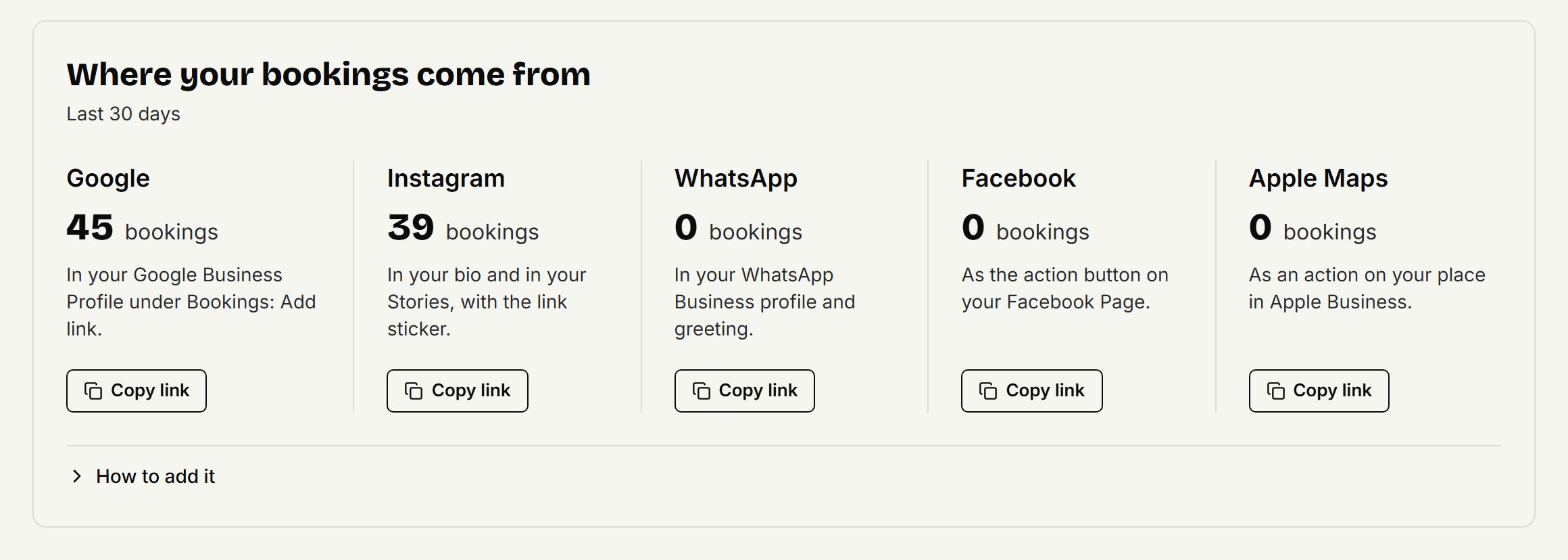
Click Copy link for a place.
Put the link there. The card shows how under How to add it, and there's a short version below.
Each link counts its own online bookings, so you see what each place brings you.
Where each link goes
Google: search for your shop on Google while signed in with the account that manages its Business Profile, then choose Bookings and Add link.
Instagram: in your bio through Edit profile, Links and Add external link, and in your Stories with the Link sticker.
WhatsApp: in WhatsApp Business under Tools, Business profile and Website, and in your Greeting message and Away message.
Facebook: as the action button on your Facebook Page, through Options and Add action button. Choose Book now if it takes a web address.
Apple Maps: as an action on your place in Apple Business, at business.apple.com. Apple checks your business first and then approves the button; allow a few working days.
On coupehub.nl/barbershops
On coupehub.nl/barbershops customers look for a barbershop near them, on a list and a map. Your shop appears there by itself, with your name, photos, address, opening hours, treatments and first free time, once:
you have a cover photo or a logo;
your location has opening hours and an address that can be found on the map;
at least one barber can be booked.
A city only appears on the site once enough shops from it are listed. Rather not be in it? Under Settings → Online booking, switch off Listed on coupehub. Your shop disappears within a few minutes; your own links keep working.
Updated on November 15, 2026
Did this help?