
If you have your own website, you can put the booking steps on it yourself. Customers then choose a barber, treatment and time on your site, in a window showing your booking page.
Steps
Open Settings and choose Online booking.
Go to Booking on your own website and click Copy code.
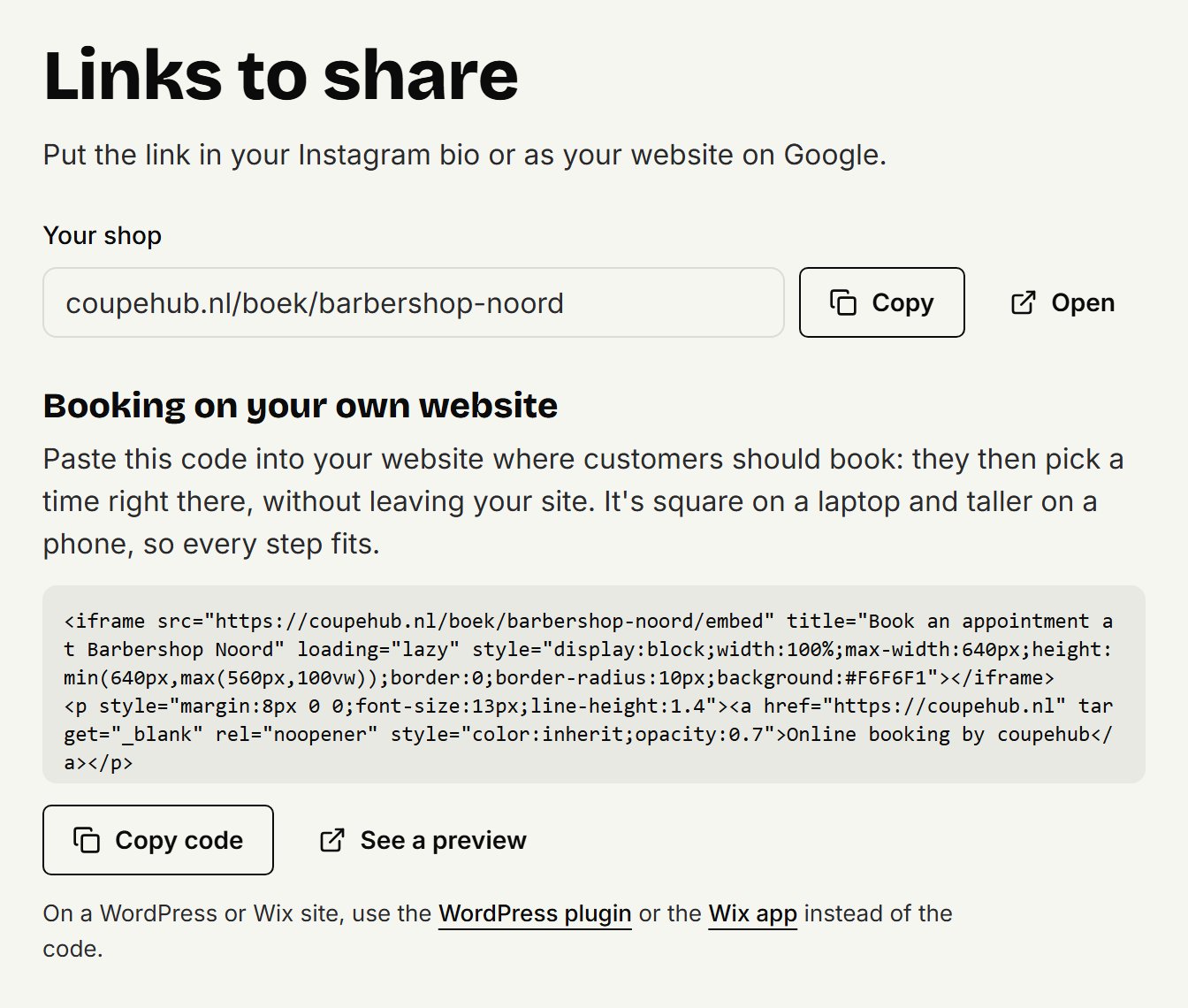
In your website builder, open the page where customers should book.
Add a block for HTML, code or an embed, and paste the code into it.
Save the page and publish it.
See a preview shows you how it will look first.
How it looks
On a laptop the window is square. On a phone it's as wide as the screen and a bit taller, so each step fits. A small link to coupehub sits under the window. After booking, the customer sees their confirmation in the same window. They can move or cancel it there too, and Book a new appointment takes them back to booking in the window. Joining the waitlist keeps them in the window as well.
Whatever you change in your treatments, barbers or times shows up in it straight away. You don't need to paste the code again.
Per website builder
On WordPress and Wix, use the coupehub plugin or app instead of the code: there you only paste your booking link. Step by step with the code for Squarespace, Jimdo and Google Sites.
Rather have a button
If you don't want a window on your site, make your own button that goes to your booking link. Copy the link under Your shop with Copy. Sharing your booking link has more.
Updated on November 15, 2026
Did this help?